RAM and disk caching for huge images
A long SAR capture can be tens of gigabytes: neither the raw sweeps nor the range compressed data fit in RAM, let alone in VRAM. torchbp.data provides lazy data sources that stand in for the range compressed data tensor:
MemmapDatawraps any sliceable on-disk array (a numpy memmap, an h5py dataset, a zarr array) and loads sweep ranges on demand.CallbackDatacalls a user function to load a sweep range. For example a safetensorsget_slice, or a reader that seeks into a custom capture format.CachedDatacaches another source’s transformed output in RAM or in a memory-mapped disk file, so an expensive per-chunk pipeline runs only once per sweep even when a consumer reads the data many times.
Every backprojection function accepts a lazy source in place of the tensor. torchbp.ops.ffbp and the gpga/gpga_tde autofocus consume it in bounded chunks, so their peak data residency stays far below the full extent. The other functions (direct backprojection, afbp, cfbp) accept a lazy source but materialize the full extent at entry.
This notebook demonstrates the machinery on a miniature simulated capture that plays the role of a file too large to load. The sizes are small because the notebook runs on the documentation build server, but nothing in the code depends on the data being small.
[1]:
import gc
import os
import tempfile

import torch
import numpy as np
import torchbp
import matplotlib.pyplot as plt
from numpy import hamming
from torchbp.util import detrend

torch.manual_seed(125)
device = "cuda" if torch.cuda.is_available() else "cpu"
print("Device:", device)
Device: cpu
Simulated raw data on disk
We simulate a small FMCW acquisition: a platform flying along the \(y\) axis over a grid of point targets, with a smooth low-frequency motion error that the autofocus will recover at the end of the notebook. The simulated raw dechirped sweeps are written to a file on disk and the in-memory copy is deleted. From here on, the file is the only place the raw data exists, exactly as it would be for a real capture that does not fit in memory.
[2]:
fc = 6e9        # RF center frequency (Hz)
bw = 300e6      # RF bandwidth (Hz)
tsweep = 200e-6 # Sweep length (s)
fs = 3e6        # Sampling frequency (Hz)
nsweeps = 512   # Number of measurements (aperture positions)
nsamples = int(fs * tsweep)  # Time-domain samples per sweep
oversample = 2  # Range FFT oversampling (reduces interpolation error)
nfft = nsamples * oversample

wl = 3e8 / fc
r_res = 3e8 / (2 * bw * oversample)  # Range bin size in the compressed data

# Imaging grid. Azimuth angle "theta" is sin of radians.
nr = 2 * int(1 + (70 - 30) / (3e8 / (2 * bw)))
grid_polar = {"r": (30, 70), "theta": (-0.7, 0.7), "nr": nr, "ntheta": 384}

# 3x3 grid of point targets.
targets = [[x, y, 0] for x in np.linspace(35, 65, 3) for y in np.linspace(-15, 15, 3)]
target_pos = torch.tensor(targets, dtype=torch.float32, device=device)
target_rcs = torch.ones(target_pos.shape[0], dtype=torch.float32, device=device)

# Nominal straight trajectory and the true one with a band-limited error.
pos_nominal = torch.zeros([nsweeps, 3], dtype=torch.float32, device=device)
pos_nominal[:, 1] = torch.linspace(-nsweeps / 2, nsweeps / 2, nsweeps) * 0.25 * wl
pos_nominal[:, 2] = 20

def bandlimited_error(scale, cutoff=nsweeps // 32):
    r = scale * torch.rand(nsweeps, device=device) * wl
    fdata = torch.fft.fft(r)
    fdata[cutoff // 2:-cutoff // 2] = 0
    e = torch.fft.ifft(fdata).real
    return detrend(e - torch.mean(e))

pos = pos_nominal.clone()
pos[:, 0] += bandlimited_error(10)
pos[:, 1] += bandlimited_error(2.5)
pos[:, 2] += bandlimited_error(5)

raw = torchbp.util.generate_fmcw_data(
    target_pos, target_rcs, pos, fc, bw, tsweep, fs, rvp=False)

# Write the raw sweeps to disk and drop the in-memory copy.
tmpdir = tempfile.mkdtemp()
raw_path = os.path.join(tmpdir, "raw_sweeps.npy")
np.save(raw_path, raw.cpu().numpy())
del raw
print(f"Raw capture on disk: {os.path.getsize(raw_path) / 1e6:.1f} MB")
Raw capture on disk: 2.5 MB
Lazy source with a range compression transform
MemmapData wraps the on-disk array. The transform argument is the per-chunk processing pipeline: it is called as transform(chunk, start, stop) after the chunk has been moved to the compute device, where start/stop are the absolute sweep indices of the chunk, so per-sweep factors. Here the azimuth window over the full aperture can be indexed correctly no matter which chunk is being processed. On a GPU the pipeline runs there, so range compression is accelerated for free.
The transform may change the dtype and the number of samples per sweep (here: windowing plus an oversampled inverse FFT), so the declared shape and dtype describe the transform’s output, not the raw file.
[3]:
wr = torch.tensor(hamming(nsamples)[None, :], dtype=torch.float32, device=device)
wa = torch.tensor(hamming(nsweeps)[:, None], dtype=torch.float32, device=device)

# Counters to observe when (and how much) data is actually loaded.
stats = {"chunks": 0, "sweeps": 0, "max_chunk": 0}

def range_compress(chunk, start, stop):
    stats["chunks"] += 1
    stats["sweeps"] += stop - start
    stats["max_chunk"] = max(stats["max_chunk"], stop - start)
    x = chunk * wa[start:stop] * wr
    return torch.fft.ifft(x, dim=-1, n=nfft)

raw_mm = np.load(raw_path, mmap_mode="r")
lazy = torchbp.MemmapData(raw_mm, device=device, dtype=torch.complex64,
                          transform=range_compress, shape=(nsweeps, nfft))
print(lazy.shape, lazy.dtype, lazy.device)
torch.Size([512, 1200]) torch.complex64 cpu
The lazy source mimics the small part of the Tensor interface the library uses. Slicing is free, it returns a view restricted to a sweep range without touching the disk, and load() materializes a view by reading and transforming exactly that range.
[4]:
view = lazy[100:200]
print("After slicing:  ", stats)
chunk = view.load()
print("After view.load:", stats, "-> tensor", tuple(chunk.shape))
After slicing:   {'chunks': 0, 'sweeps': 0, 'max_chunk': 0}
After view.load: {'chunks': 1, 'sweeps': 100, 'max_chunk': 100} -> tensor (100, 1200)
As a reference for the rest of the notebook, run the same range compression eagerly on the whole array at once. This is what a script that loads everything up front would compute, and what the lazy path must reproduce.
[5]:
stats.update(chunks=0, sweeps=0, max_chunk=0)
data_eager = range_compress(
    torch.as_tensor(np.array(raw_mm)).to(device), 0, nsweeps)
stats.update(chunks=0, sweeps=0, max_chunk=0)

err = torch.linalg.norm(lazy.load() - data_eager) / torch.linalg.norm(data_eager)
print(f"Lazy vs eager relative error: {err.item():.2e}")
Lazy vs eager relative error: 0.00e+00
Streaming fast factorized backprojection
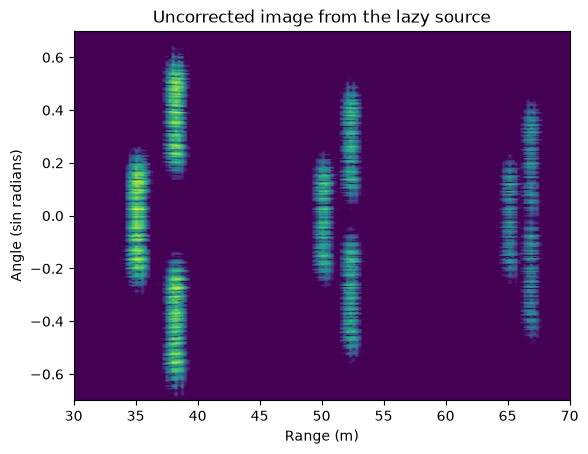
ffbp slices the lazy source down its subaperture recursion tree and materializes data only at the leaves. With stages=4 and 512 sweeps each leaf is 64 sweeps, so at no point is more than 1/8 of the data resident. The data is read once, in leaf-sized chunks, and the image matches the one formed from the eager tensor.
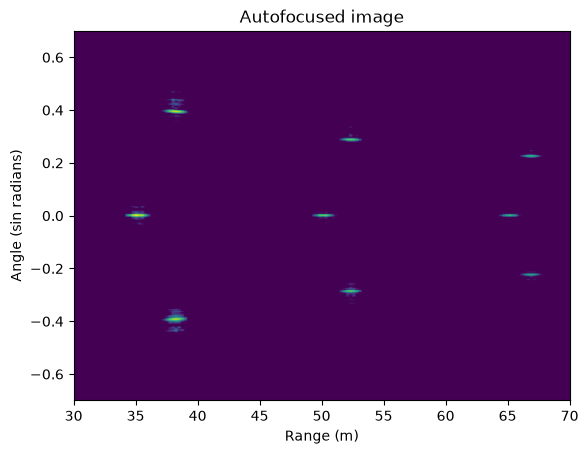
The platform motion error is still uncompensated here, so the point targets are smeared. The autofocus at the end of the notebook fixes this.
[6]:
stats.update(chunks=0, sweeps=0, max_chunk=0)
img_lazy = torchbp.ops.ffbp(lazy, grid_polar, fc, r_res, pos_nominal, stages=4)
print(f"{stats['chunks']} chunks of at most {stats['max_chunk']} sweeps "
      f"({stats['sweeps']} sweeps in total)")

img_eager = torchbp.ops.ffbp(data_eager, grid_polar, fc, r_res, pos_nominal, stages=4)
err = torch.linalg.norm(img_lazy - img_eager) / torch.linalg.norm(img_eager)
print(f"Image relative error lazy vs eager: {err.item():.2e}")

img_db = 20 * torch.log10(torch.abs(img_lazy)).cpu()
m = torch.max(img_db)
extent = [*grid_polar["r"], *grid_polar["theta"]]
plt.figure()
plt.title("Uncorrected image from the lazy source")
plt.imshow(img_db.numpy().T, origin="lower", vmin=m - 30, vmax=m,
           extent=extent, aspect="auto")
plt.xlabel("Range (m)")
plt.ylabel("Angle (sin radians)");
8 chunks of at most 64 sweeps (512 sweeps in total)
Image relative error lazy vs eager: 0.00e+00
Caching: run the pipeline once, read many times
A single ffbp call reads each sweep exactly once, so transforming on the fly costs nothing extra. Iterative consumers are different: gpga/gpga_tde re-read the data on every autofocus iteration, which would re-run the range compression each time. CachedData sits between the source and the consumer and stores the transformed sweeps, in one of three places:
storage="ram"on the compute device (the defaultstorage_device): once filled, this is equivalent to an eagerly transformed tensor. Loads are zero-copy views of the cache, so the lazy plumbing adds no per-load overhead.storage="ram", storage_device="cpu"with a CUDA compute device: for data that fits in system RAM but not in VRAM. The cache stages in pinned CPU memory and each load copies its chunk to the GPU at full transfer bandwidth.storage="disk": a memory-mapped scratch file, for data larger than RAM. RAM use stays bounded. The operating system’s page cache keeps the hot parts fast.
The cache is keyed per sweep. The first load of a sweep runs the pipeline, later loads (also overlapping or out-of-order ones) read the cache.
[7]:
stats.update(chunks=0, sweeps=0, max_chunk=0)
cached = torchbp.CachedData(lazy, storage="ram")

first = cached.load()   # runs the pipeline
after_first = dict(stats)
second = cached.load()  # reads the cache
print("After first load: ", after_first)
print("After second load:", stats)
print("Zero-copy views of the cache:", first.data_ptr() == second.data_ptr())
After first load:  {'chunks': 1, 'sweeps': 512, 'max_chunk': 512}
After second load: {'chunks': 1, 'sweeps': 512, 'max_chunk': 512}
Zero-copy views of the cache: True
storage="disk" behaves identically but backs the cache with a file. By default the file is a temporary one that is deleted when the cache is garbage collected (placed in /var/tmp if the system temp dir is a RAM-backed tmpfs, so a “disk” cache never silently consumes the RAM it is supposed to save), an explicit path is kept on disk.
[8]:
cache_path = os.path.join(tmpdir, "compressed.torchbp-cache")
disk_cached = torchbp.CachedData(lazy, path=cache_path, storage="disk")
err = torch.linalg.norm(disk_cached.load() - data_eager) / torch.linalg.norm(data_eager)
print(f"Disk cache on disk: {os.path.getsize(cache_path) / 1e6:.1f} MB, "
      f"relative error {err.item():.2e}")
del disk_cached
Disk cache on disk: 4.9 MB, relative error 0.00e+00
fill(): compress once, then free the raw data
An eager script has a useful memory property: once range compression is done, the raw data can be freed. A lazy pipeline pins it instead, the cache holds the source, the source holds the raw array. CachedData.fill() restores the eager timeline: it populates the whole cache in bounded blocks and then drops the source, so the cache becomes the only backing store and the raw data is free to delete. Here we prove it by removing the raw file from disk. The cache keeps working without it.
[9]:
stats.update(chunks=0, sweeps=0, max_chunk=0)
cached = torchbp.CachedData(lazy, storage="ram").fill()
print(f"fill() transformed each sweep exactly once: {stats['sweeps']} sweeps")

# The cache no longer references the source: delete the raw data entirely.
del lazy, raw_mm
gc.collect()
os.remove(raw_path)

err = torch.linalg.norm(cached.load() - data_eager) / torch.linalg.norm(data_eager)
print(f"Raw file deleted. Cache still serves the data, relative error {err.item():.2e}")
fill() transformed each sweep exactly once: 512 sweeps
Raw file deleted. Cache still serves the data, relative error 0.00e+00
Choosing the storage tier automatically
torchbp.data.available_ram() reports the available system RAM in bytes, counting reclaimable caches as available (Linux MemAvailable, Windows GlobalMemoryStatusEx). A processing script can use it, together with torch.cuda.mem_get_info(), to pick the tier: compute device when the compressed data fits comfortably, pinned CPU RAM when VRAM is short, disk when RAM is short too.
[10]:
def choose_storage(nbytes):
    if nbytes > torchbp.data.available_ram() // 2:
        return {"storage": "disk"}
    if device == "cuda" and nbytes > torch.cuda.mem_get_info()[0] // 2:
        return {"storage": "ram", "storage_device": "cpu"}
    return {"storage": "ram"}

nbytes = nsweeps * nfft * data_eager.element_size()
print(f"Available RAM: {torchbp.data.available_ram() / 2**30:.1f} GiB")
print(f"This capture ({nbytes / 1e6:.1f} MB) ->", choose_storage(nbytes))
print("A 40 GB capture ->", choose_storage(40 * 10**9))
Available RAM: 14.0 GiB
This capture (4.9 MB) -> {'storage': 'ram'}
A 40 GB capture -> {'storage': 'disk'}
Autofocus on the cached data
gpga_tde recovers the platform motion error from the data. It re-reads the data every iteration. The image is re-formed with updated positions, and the estimation stage reads the data in bounded chunks, so it is exactly the consumer the cache exists for. With algorithm="ffbp" the image formation inside the autofocus streams the data leaf by leaf as well.
The transform counters stay at zero throughout: the pipeline never runs again, every read is served from the cache.
[11]:
stats.update(chunks=0, sweeps=0, max_chunk=0)
img_focused, pos_solved = torchbp.autofocus.gpga_tde(
    None, cached, pos_nominal, fc, r_res, grid_polar,
    azimuth_divisions=4, range_divisions=4,
    algorithm="ffbp", image_opts={"stages": 4}, estimate_z=True)
print("Pipeline runs during autofocus:", stats["chunks"])

rms = lambda a, b: torch.sqrt(torch.mean(torch.square(a - b))).item()
print(f"RMS position error before autofocus: {1e3 * rms(pos_nominal, pos):.1f} mm")
print(f"RMS position error after autofocus:  {1e3 * rms(pos_solved, pos):.1f} mm")
Pipeline runs during autofocus: 0
RMS position error before autofocus: 14.7 mm
RMS position error after autofocus:  20.6 mm
[12]:
img_db = 20 * torch.log10(torch.abs(img_focused)).cpu()
m = torch.max(img_db)
plt.figure()
plt.title("Autofocused image")
plt.imshow(img_db.numpy().T, origin="lower", vmin=m - 30, vmax=m,
           extent=extent, aspect="auto")
plt.xlabel("Range (m)")
plt.ylabel("Angle (sin radians)");
Notes and limitations
Direct backprojection,
afbpandcfbpaccept a lazy source but load the full extent at entry, onlyffbpand thegpga/gpga_tdeautofocus are memory efficient with one.For BP, manual image tiling and data partitioning can be used to generate a huge image, but at this time there is not support for it in torchbp.
Gradients do not flow to the data through a lazy source (
requires_gradis always False). Gradients with respect to positions are unaffected.CachedDatasupports only 2D[nsweeps, samples]sources.For a real out-of-core run, combine the pieces as in this notebook: a
MemmapData/CallbackDataover the capture file with the range compression astransform, wrapped in aCachedDatawith the tier chosen fromavailable_ram()and filled withfill()before autofocus. Seeexamples/sar_process_safetensor_gpga.pyfor a full script.
[ ]: